Skip to content

Connecting Multiple LCDs

If the LCD device has a CS (Chip Select) pin, you can connect multiple devices in parallel to the same SPI interface.

Here, let's try connecting two ST7789s. The breadboard wiring image is as follows:
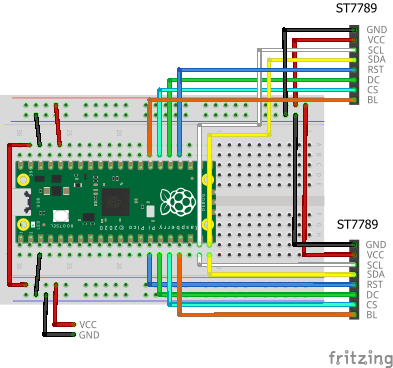
circuit-st7789-multi.png

Rewrite the source file lcdtest.cpp as follows:
lcdtest.cpp
#include <stdio.h>
#include "pico/stdlib.h"
#include "jxglib/Display/ST7789.h"
#include "jxglib/Font/shinonome16-japanese-level1.h"
#include "jxglib/sample/cat-240x320.h"
#include "jxglib/sample/Text_Botchan.h"

using namespace jxglib;

int main()
{
  ::stdio_init_all();
  ::spi_init(spi1, 125 * 1000 * 1000);
  GPIO14.set_function_SPI1_SCK();
  GPIO15.set_function_SPI1_TX();
  Display::ST7789 display1(spi1, 240, 320, {RST: GPIO10, DC: GPIO11, CS: GPIO12, BL: GPIO13});
  Display::ST7789 display2(spi1, 240, 320, {RST: GPIO18, DC: GPIO19, CS: GPIO20, BL: GPIO21});
  display1.Initialize(Display::Dir::Rotate0);
  display2.Initialize(Display::Dir::Rotate90);
  display1.DrawImage(0, 0, image_cat_240x320);
  display2.SetFont(Font::shinonome16);
  display2.DrawStringWrap(0, 0, Text_Botchan);
}

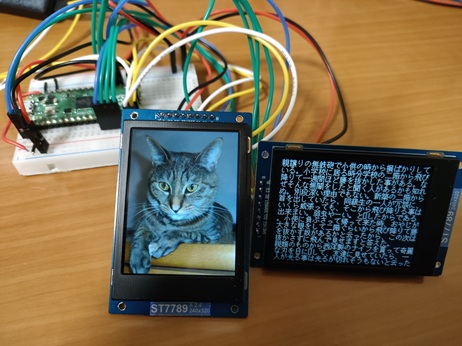
lcdtest-multi.jpg

As long as you have enough GPIOs, you can connect as many LCDs as you want to the same SPI interface... or so you'd like to think, but if you connect too many, the signal waveform seems to deteriorate. I confirmed that you can connect up to four LCDs to the same SPI1, but if one of them is an ILI9341, it does not display.


  1. At that time, I ran out of GPIOs, so I connected the BL (backlight) pin directly to VCC (3.3V). ↩