File System on USB Storage
The Pico board can use its USB host function to connect USB storage. pico-jxglib implements a USB storage handler using the Mass Storage Class provided by the tinyusb library.
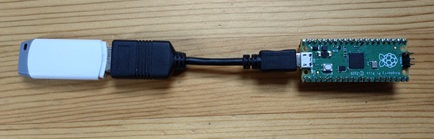
To use the Pico board's USB host function, you need an OTG cable to convert from microB type to A type.
Creating a Project
From the VSCode command palette, run >Raspberry Pi Pico: New Pico Project and create a project with the following settings. For details on creating a Pico SDK project, building, and writing to the board, see "Getting Started with Pico SDK".
- Name ... Enter the project name. In this example, enter
fs-media. - Board type ... Select the board type.
- Location ... Select the parent directory where the project directory will be created.
- Stdio support ... Select the port (UART or USB) to connect Stdio. If using USB storage, be sure to disconnect the USB check to avoid conflicts.
- Code generation options ... Check
Generate C++ code
The project directory and pico-jxglib directory configuration is assumed to be as follows:
Below, we will edit the CMakeLists.txt and source files to create the program.
Program
Create a program that monitors the connection of the USB storage and displays the directory listing when the connection is detected.
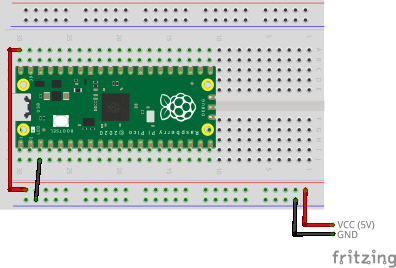
The breadboard wiring image is as follows. Use an OTG cable to convert from microB type to A type. The Pico board's power supply is 40 pin (VBUS).
Add the following lines to the end of CMakeLists.txt. Also, confirm that Stdio USB connection is disabled (pico_enable_stdio_usb(fs-media 0)):
target_link_libraries(fs-media jxglib_FAT_USBMSC)
add_subdirectory(${CMAKE_CURRENT_LIST_DIR}/../pico-jxglib pico-jxglib)
jxglib_configure_FAT(fs-media FF_VOLUMES 1)
jxglib_configure_USBHost(fs-media CFG_TUH_MSC 1)
Edit the source file as follows:
#include "pico/stdlib.h"
#include "jxglib/FAT/USBMSC.h"

using namespace jxglib;

int main()
{
    ::stdio_init_all();
    USBHost::Initialize();
    FAT::USBMSC drive("Drive:");
    bool connectedFlag = false;
    for (;;) {
        if (connectedFlag) {
            if (!drive.CheckMounted()) {
                ::printf("USB storage disconnected.\n");
                connectedFlag = false;
            }
        } else if (drive.Mount()) {
            ::printf("USB storage connected.\n");
            connectedFlag = true;
            FS::Dir* pDir = FS::OpenDir("Drive:/");
            if (pDir) {
                FS::FileInfo* pFileInfo;
                while (pFileInfo = pDir->Read()) {
                    ::printf("%-16s%d\n", pFileInfo->GetName(), pFileInfo->GetSize());
                    delete pFileInfo;
                }
                pDir->Close();
                delete pDir;
            }
        }
        Tickable::Tick();
    }
}
FAT::USBMSC instance generates a FAT file system. The constructor details are as follows:
FAT::USBMSC(const char* driveName, uint8_t orderHint = UINT8_MAX)drivename: Path name to use for the drive. You can specify any string.orderHint: Instance order. If you have multiple USB storage devices, specify the order to handle them in the same sequence.
File system API details are in "Implementing a File System on the Pico Board with pico-jxglib and Using Flash Memory Fully".