Telnet Server
Connecting to a Telnet Server on the Pico Board
Start a Telnet server on the Pico board with the telnet-server command:
Try connecting to the Pico board with Tera Term. From the menu, select File - New Connection... to open the connection dialog:
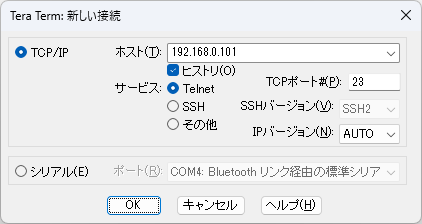
Select TCP/IP, enter the Pico board’s IP address as the host, select Telnet as the service, and click OK. A new Tera Term window will open and connect to the board. You’ll be prompted for a password; just press Enter if you haven’t set one yet.
Now you can run all pico-jxgLABO commands remotely! You can even use logic analyzer features remotely.
Note: When connected via Telnet, USB serial command input is disabled. Disconnecting Telnet restores USB serial communication again.
Setting a Password
It’s not secure to run a Telnet server on the network without a password, so set one. (Note: Telnet transmits in plain text, so it’s not fully secure, but at least prevents unauthorized logins.)
Set a password with the password command:
This creates a .password file in the root of the L: drive, storing a hashed password.
Password entry is only required for Telnet connections, not USB serial.