Network
This page explains how to connect a Pico board to a Wi-Fi network using pico-jxgLABO.
Traditionally, connecting a microcontroller to a network requires writing and running a program, often hardcoding the SSID and password for Wi-Fi, which makes distribution and maintenance difficult. In the pico-jxgLABO environment, shell commands are provided for network connection, allowing users to connect to networks interactively via commands.
Raspberry Pi Pico and Wi-Fi Functionality
Pico W and Pico 2 W
Pico W and Pico 2 W are Pico boards equipped with a CYW43439 Wi-Fi chip (CYW43 chip).
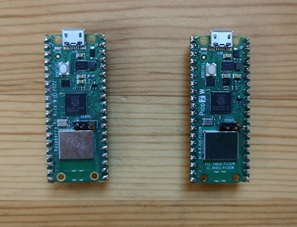 Pico W and Pico 2 W
Pico W costs about 1,200 yen, Pico 2 W about 1,400 yen—roughly 400 yen more than the non-Wi-Fi models due to the CYW43 chip.
Controlling the CYW43 chip with limited GPIOs is challenging. For more details, see this article.
PIO (Programmable I/O) is also used for CYW43 control. Pico W has 2 PIO blocks, Pico 2 W has 3, but one block is used for CYW43, so be careful when designing systems that use PIO1.
Use Cases for Pico’s Network Functionality
Pico W and Pico 2 W’s Wi-Fi is often used for IoT (Internet of Things) applications, such as sending sensor data to the cloud or controlling devices from the cloud. HTTP allows web browser operation, and MQTT enables lightweight messaging.
In this article, we’ll run a Telnet server on the Pico board so you can execute pico-jxgLABO shell commands remotely. With terminal software like Tera Term, you can operate the Pico board without a USB cable.
In the photo below, multiple Pico W and Pico 2 W boards are connected to a Wi-Fi network, each with a fixed IP address.
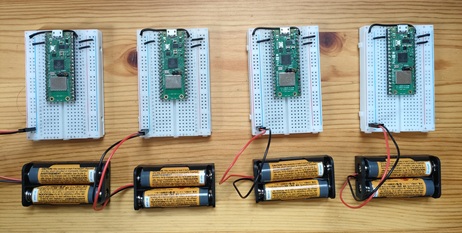
You can operate each board without physical cable connections, allowing more flexible operation!
-
pico-jxgLABO also uses PIO for logic analyzer functionality. ↩