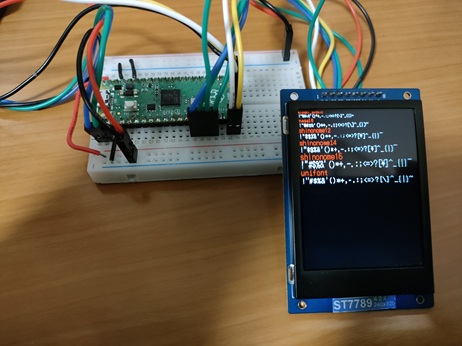
Let's connect a TFT LCD and perform drawing operations.
Here, we will create a sample program that implements a custom command named argtest. It displays the contents of the arguments passed to it.
Create a new Pico SDK project named tftlcd-hardcoded.
Create Pico SDK Project
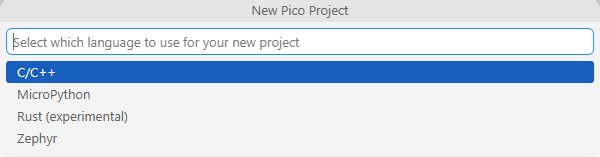
In VSCode, run >Raspberry Pi Pico: New Pico Project in the command palette.
In the dialog below, select C/C++.
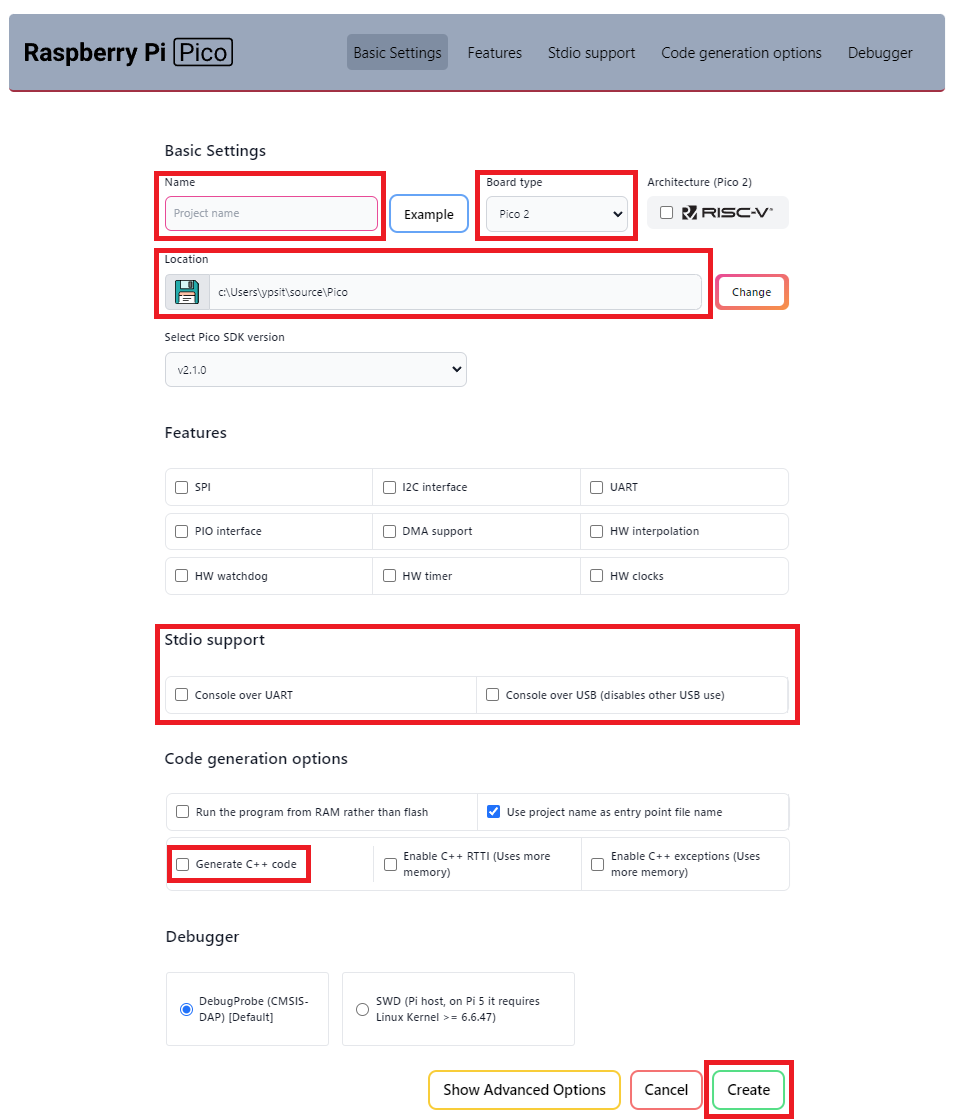
Create a project with the following settings:
Name ... Enter the project name.
Board type ... Select your board type.
Location ... Select the parent directory where the project directory will be created.
Stdio support ... Leave Console over USBunchecked when you use LABOPlatform or other USB features because they conflict with each other. You can enable it by editing the CMakeLists.txt file later.
Code generation options ... Check Generate C++ code.
Open Existing Pico SDK Project
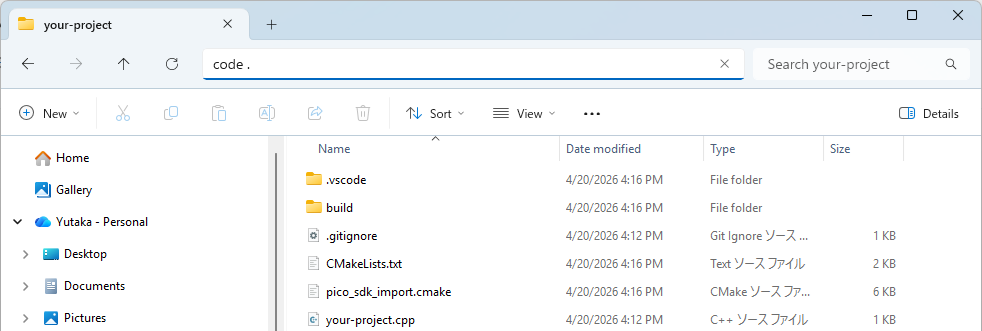
Open the project folder in VSCode using one of the following methods:
In a command prompt, change the current directory to the project folder and execute code ..
In a Explorer, choose the project folder, push Alt+D to focus the address bar, and execute code ..
If the folder is already prepared as a Pico SDK project, just proceed with editing and building the project.
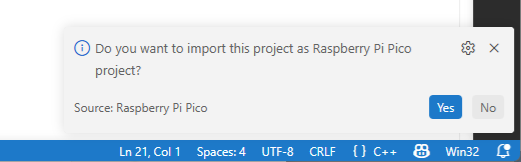
If not, you will see the following message at the bottom right corner of VSCode.
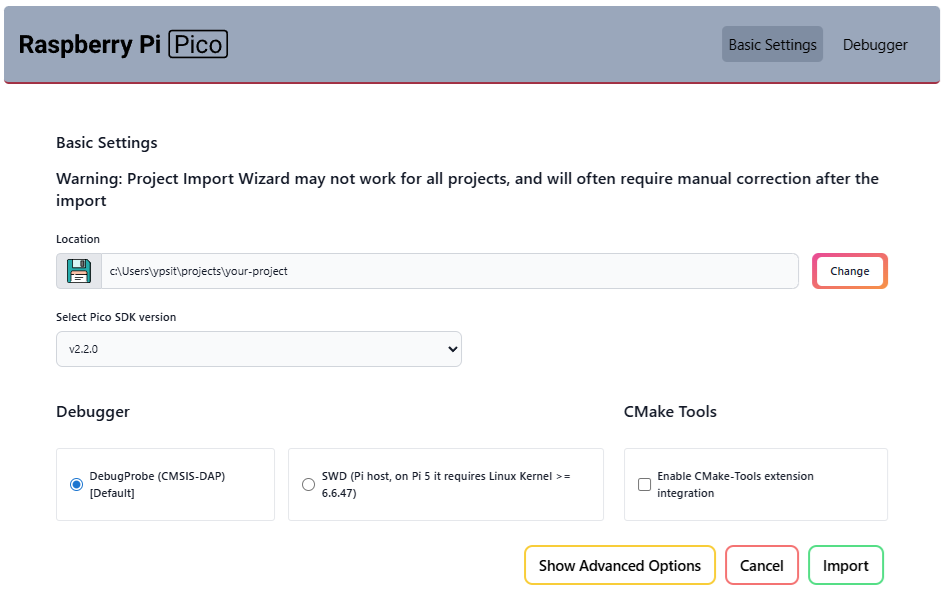
Click Yes and you will see the following window.
Click Import and the project will be prepared as a Pico SDK project.
When the Do you want to import this project as Raspberry Pi Pico project? message disappears before you click Yes, you can reveal it by clicking the icon at the bottom right corner of VSCode.
Clone the pico-jxglib repository from GitHub so the direcory structure looks like this:
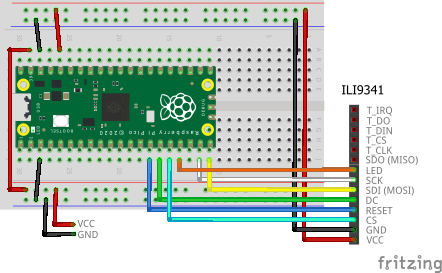
#include<stdio.h>#include"pico/stdlib.h"#include"jxglib/Shell.h"#include"jxglib/Serial.h"#include"jxglib/Display/ILI9341.h"#include"jxglib/DrawableTest.h"usingnamespacejxglib;ShellCmd_Named(draw_rotate,"draw-rotate","Rotate the image"){auto&display=Display::GetInstance(0);DrawableTest::RotateImage(display);returnResult::Success;}ShellCmd_Named(draw_string,"draw-string","Draw a string"){auto&display=Display::GetInstance(0);DrawableTest::DrawString(display);returnResult::Success;}ShellCmd_Named(draw_fonts,"draw-fonts","Draw fonts"){auto&display=Display::GetInstance(0);DrawableTest::DrawFonts(display);returnResult::Success;}intmain(){::stdio_init_all();// Prepare the Shell with StdioSerial::Terminalterminal;Shell::AttachTerminal(terminal.Initialize());// Initialize the display::spi_init(spi1,125*1000*1000);GPIO14.set_function_SPI1_SCK();GPIO15.set_function_SPI1_TX();Display::ILI9341display(spi1,240,320,{RST:GPIO10,DC:GPIO11,CS:GPIO12,BL:GPIO13});display.Initialize(Display::Dir::Rotate0);for(;;){Tickable::Tick();}}
The breadboard wiring image is as follows:
Add the following lines to the end of CMakeLists.txt:
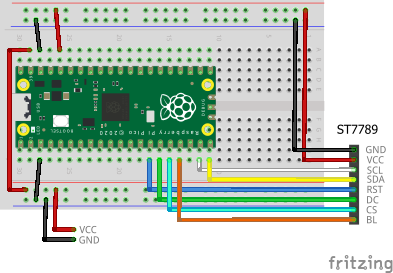
#include<stdio.h>#include"pico/stdlib.h"#include"jxglib/Shell.h"#include"jxglib/Serial.h"#include"jxglib/Display/ST7789.h"#include"jxglib/DrawableTest.h"usingnamespacejxglib;ShellCmd_Named(draw_rotate,"draw-rotate","Rotate the image"){auto&display=Display::GetInstance(0);DrawableTest::RotateImage(display);returnResult::Success;}ShellCmd_Named(draw_string,"draw-string","Draw a string"){auto&display=Display::GetInstance(0);DrawableTest::DrawString(display);returnResult::Success;}ShellCmd_Named(draw_fonts,"draw-fonts","Draw fonts"){auto&display=Display::GetInstance(0);DrawableTest::DrawFonts(display);returnResult::Success;}intmain(){::stdio_init_all();// Prepare the Shell with StdioSerial::Terminalterminal;Shell::AttachTerminal(terminal.Initialize());// Initialize the display::spi_init(spi1,125*1000*1000);GPIO14.set_function_SPI1_SCK();GPIO15.set_function_SPI1_TX();Display::ST7789display(spi1,240,240,{RST:GPIO10,DC:GPIO11,BL:GPIO13});display.Initialize(Display::Dir::Rotate0);for(;;){Tickable::Tick();}}
The breadboard wiring image is as follows:
Add the following lines to the end of CMakeLists.txt:
#include<stdio.h>#include"pico/stdlib.h"#include"jxglib/Shell.h"#include"jxglib/Serial.h"#include"jxglib/Display/ST7735.h"#include"jxglib/DrawableTest.h"usingnamespacejxglib;ShellCmd_Named(draw_rotate,"draw-rotate","Rotate the image"){auto&display=Display::GetInstance(0);DrawableTest::RotateImage(display);returnResult::Success;}ShellCmd_Named(draw_string,"draw-string","Draw a string"){auto&display=Display::GetInstance(0);DrawableTest::DrawString(display);returnResult::Success;}ShellCmd_Named(draw_fonts,"draw-fonts","Draw fonts"){auto&display=Display::GetInstance(0);DrawableTest::DrawFonts(display);returnResult::Success;}intmain(){::stdio_init_all();// Prepare the Shell with StdioSerial::Terminalterminal;Shell::AttachTerminal(terminal.Initialize());// Initialize the display::spi_init(spi1,125*1000*1000);GPIO14.set_function_SPI1_SCK();GPIO15.set_function_SPI1_TX();Display::ST7735display(spi1,80,160,{RST:GPIO10,DC:GPIO11,CS:GPIO12,BL:GPIO13});display.Initialize(Display::Dir::Rotate0);for(;;){Tickable::Tick();}}
The breadboard wiring image is as follows:
Add the following lines to the end of CMakeLists.txt:
#include<stdio.h>#include"pico/stdlib.h"#include"jxglib/Shell.h"#include"jxglib/Serial.h"#include"jxglib/Display/ST7735.h"#include"jxglib/DrawableTest.h"usingnamespacejxglib;ShellCmd_Named(draw_rotate,"draw-rotate","Rotate the image"){auto&display=Display::GetInstance(0);DrawableTest::RotateImage(display);returnResult::Success;}ShellCmd_Named(draw_string,"draw-string","Draw a string"){auto&display=Display::GetInstance(0);DrawableTest::DrawString(display);returnResult::Success;}ShellCmd_Named(draw_fonts,"draw-fonts","Draw fonts"){auto&display=Display::GetInstance(0);DrawableTest::DrawFonts(display);returnResult::Success;}intmain(){::stdio_init_all();// Prepare the Shell with StdioSerial::Terminalterminal;Shell::AttachTerminal(terminal.Initialize());// Initialize the display::spi_init(spi1,125*1000*1000);GPIO14.set_function_SPI1_SCK();GPIO15.set_function_SPI1_TX();Display::ST7735::TypeBdisplay(spi1,128,160,{RST:GPIO10,DC:GPIO11,CS:GPIO12,BL:GPIO13});display.Initialize(Display::Dir::Rotate0);for(;;){Tickable::Tick();}}
The breadboard wiring image is as follows:
Add the following lines to the end of CMakeLists.txt:
#include<stdio.h>#include"pico/stdlib.h"#include"jxglib/Shell.h"#include"jxglib/Serial.h"#include"jxglib/Display/ILI9341.h"#include"jxglib/DrawableTest.h"usingnamespacejxglib;ShellCmd_Named(draw_rotate,"draw-rotate","Rotate the image"){auto&display=Display::GetInstance(0);DrawableTest::RotateImage(display);returnResult::Success;}ShellCmd_Named(draw_string,"draw-string","Draw a string"){auto&display=Display::GetInstance(0);DrawableTest::DrawString(display);returnResult::Success;}ShellCmd_Named(draw_fonts,"draw-fonts","Draw fonts"){auto&display=Display::GetInstance(0);DrawableTest::DrawFonts(display);returnResult::Success;}intmain(){::stdio_init_all();// Prepare the Shell with StdioSerial::Terminalterminal;Shell::AttachTerminal(terminal.Initialize());// Initialize the display::spi_init(spi1,125*1000*1000);GPIO14.set_function_SPI1_SCK();GPIO15.set_function_SPI1_TX();Display::ILI9341display(spi1,240,320,{RST:GPIO10,DC:GPIO11,CS:GPIO12,BL:GPIO13});display.Initialize(Display::Dir::Rotate0);for(;;){Tickable::Tick();}}
The breadboard wiring image is as follows:
Add the following lines to the end of CMakeLists.txt:
#include<stdio.h>#include"pico/stdlib.h"#include"jxglib/Shell.h"#include"jxglib/Serial.h"#include"jxglib/Display/ILI9488.h"#include"jxglib/DrawableTest.h"usingnamespacejxglib;ShellCmd_Named(draw_rotate,"draw-rotate","Rotate the image"){auto&display=Display::GetInstance(0);DrawableTest::RotateImage(display);returnResult::Success;}ShellCmd_Named(draw_string,"draw-string","Draw a string"){auto&display=Display::GetInstance(0);DrawableTest::DrawString(display);returnResult::Success;}ShellCmd_Named(draw_fonts,"draw-fonts","Draw fonts"){auto&display=Display::GetInstance(0);DrawableTest::DrawFonts(display);returnResult::Success;}intmain(){::stdio_init_all();// Prepare the Shell with StdioSerial::Terminalterminal;Shell::AttachTerminal(terminal.Initialize());// Initialize the display::spi_init(spi1,125*1000*1000);GPIO14.set_function_SPI1_SCK();GPIO15.set_function_SPI1_TX();Display::ILI9488display(spi1,320,480,{RST:GPIO10,DC:GPIO11,CS:GPIO12,BL:GPIO13});display.Initialize(Display::Dir::Rotate0);for(;;){Tickable::Tick();}}
Running the Program
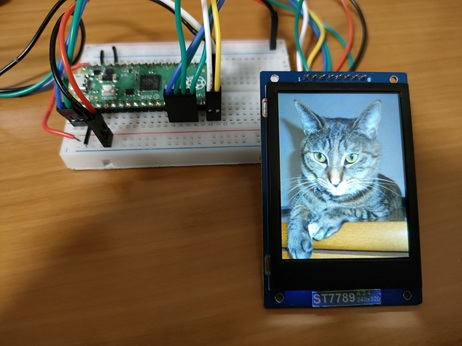
Running draw-rotate displays an image on the LCD. If you enter any key the image will be rotated by 90 degrees and redrawn.
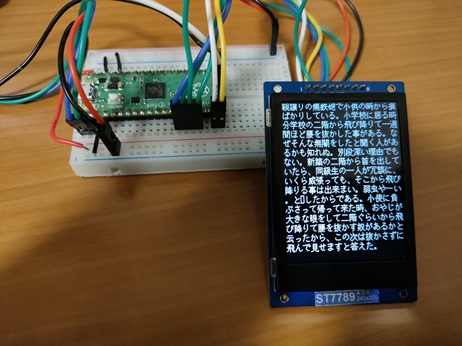
Running draw-string displays Japanese text across the entire LCD screen. You can change the font type, font scaling, and line spacing in the serial terminal.
Running draw-fonts displays strings in different fonts on the LCD. You can change the font type and scaling in the serial terminal.
 at the bottom right corner of VSCode.