About draw Command
To display an image on the display, use the draw command. The draw command has several drawing features,
Device Connection
Sub Commands
Draw Shapes
Draw Text
Draw Image
Below is an illustration of how the draw command works.
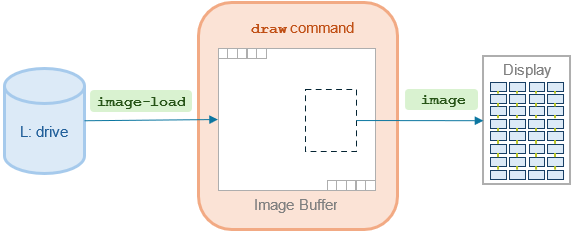
The draw command has an internal image buffer. When you load an image file with the image-load subcommand, the image data is stored in this buffer. The image subcommand displays the contents of the image buffer on the display.
The image subcommand uses the offset and size subcommands to specify the display area within the image buffer.
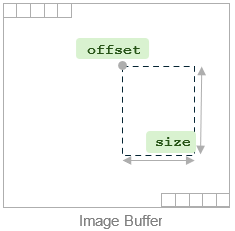
Other draw subcommands related to image drawing include:
offset-shift: Shifts the display area by a specified amountrepeat-x,repeat-y: Repeats the display area to fill the width and/or height of the display
Command Reference
draw
Help of the Command
Usage: draw [OPTION]... CMDS...
Commands:
 fill {color:COLOR}                                fills the display with the specified color
 rect-fill {color:COLOR pos:X,Y size:WIDTHxHEIGHT} fills a rectangle with the specified color
 rect {color:COLOR pos:X,Y size:WIDTHxHEIGHT}      draws a rectangle with the specified color
 font:NAME                                         sets the font to be used for text drawing
 text {pos:X,Y str:STRING}                         draws the specified text
 image-load:FILE                                   loads an image from the specified file
 image {pos:X,Y pos-shift:X,Y size:WIDTHxHEIGHT offset:X,Y offset-shift:X,Y repeat-x:N repeat-y:N}
                                                   draws the loaded image
Options:
 -h --help   prints this help
 -i --index= specifies display index (default: 0)