Sample: Color Dot
By changing the image file contents or the amount of movement of the display area, you can display various illumination patterns.
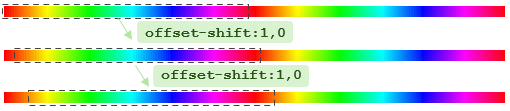
hue-32-horz.png is an image with a 32-color hue gradient pattern arranged in 2 horizontal rows.

 Image of
 hue-32-horz.png
Save this file to the Pico board's internal storage L: drive and run the following commands:
| Illumination Bar: Hue Gradient | |
|---|---|
When you run offset-shift:1,0, the display area shifts to the right, making the hue appear to flow.