How to Use the display-ws2812 Command
The display-ws2812 command allows you to use WS2812 LEDs as a display. You can display flowing patterns on an LED strip, or show images, text, and animations on a 2D matrix module.
Use the setup subcommand of display-ws2812 to set the connection information and display shape. Below is an example for a strip of 60 WS2812 LEDs connected to GPIO2:
The din subcommand specifies the GPIO pin connected to the DIN pin. straight:n means n LEDs are arranged in a straight line.
You can check the display information with the ls-display command:
You can see that it is recognized as a 60 x 1 pixel display.
WS2812 LEDs are very bright, so you can adjust the brightness with the brightness subcommand. The brightness can be set from 0.0 (off) to 1.0 (maximum). The following sets the brightness to 0.1 (10% of maximum).
If you use a 2D matrix module, specify the layout as LAYOUT-START-DIR:WIDTH,HEIGHT instead of straight. Each field is specified as follows:
LAYOUT: Specifystraightorzigzagdepending on the wiring layout.
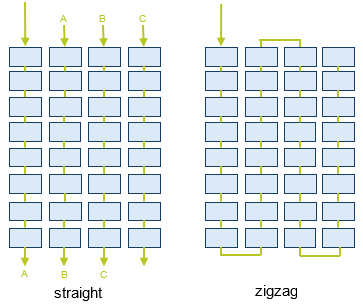
START: Specify the position of the first LED as seen from the Pico board:nw(north-west: top left),ne(north-east: top right),sw(south-west: bottom left), orse(south-east: bottom right).
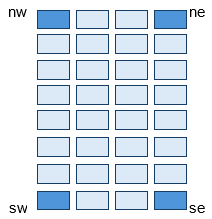
DIR: Specify the direction of each row asvert(vertical) orhorz(horizontal).
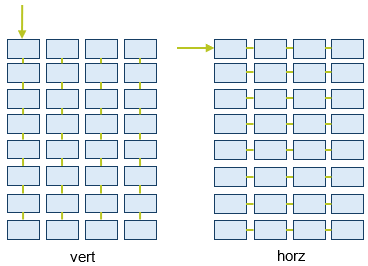
WIDTHandHEIGHT: Specify the width and height of the matrix.
For example, for a 16x16 matrix module wired in a zigzag pattern, starting from the top left and connected vertically, specify zigzag-nw-vert:16,16.